Overview
Marble runs are popular classroom and home projects because they turn the invisible forces of gravity, friction and momentum into something you can see and touch. The question “Can you improve a marble run by changing one section at a time?” invites a systematic engineering approach: build a baseline track, measure how the marble behaves, then modify a single piece, test again, and repeat. Each cycle shows how a small design tweak can speed up the marble, keep it from stopping, or make the run smoother.
Before You Begin
- Workspace: Use a sturdy table or a low shelf where the run can be built horizontally and slightly inclined. Protect the surface with a sheet of cardboard or a tablecloth.
- Adult supervision: Scissors, tape dispensers and any tools that cut cardboard require an adult. The adult should also help keep the marble run stable while children test it.
- Safety: Marbles can roll quickly and may hit fingers. Encourage kids to keep hands away from the track while the marble is moving.
Materials
- Cardboard sheets (corrugated or cereal‑box style) – the main structural material.
- Paper tubes (toilet‑paper rolls, paper towel rolls, or cut‑out paper cylinders) – for curved or straight tunnel sections.
- Masking or painter’s tape – to hold pieces together and seal gaps.
- Scissors or a craft knife (adult use only).
- Marbles (glass or plastic, 1‑2 cm diameter).
- Ruler or measuring tape – to keep track lengths consistent.
- Stopwatch (or a smartphone timer).
- Pencil and worksheet for recording data (provided in the What to Observe table).
Steps – The Iterative Engineering Process
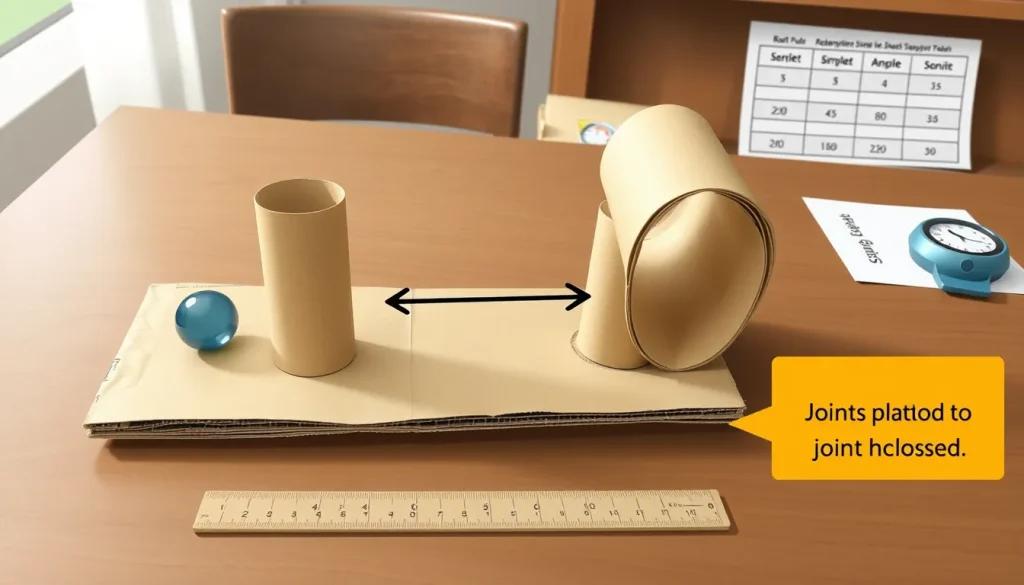
- Build a baseline run. Using cardboard and paper tubes, create a simple track that starts at a higher point (about 30 cm above the floor) and ends on the table. Include at least three sections: a straight drop, a gentle curve, and a final straight finish. Make sure all joints are glued or taped securely.
- Test the baseline. Place a single marble at the start, release it gently, and start the stopwatch. Stop the timer when the marble reaches the finish line. Record the time and note any places where the marble slowed, stopped, or bounced.
- Choose a section to modify. Look at the observation notes. If the marble stopped at a joint, a curve, or a high‑friction spot, select that part for improvement. Only one change is allowed per iteration (e.g., adjust the angle of a slope, replace a tube with a longer one, tighten a joint).
- Make the change. Using the scissors and tape, alter the chosen section. Keep the overall length of the run the same (measure with a ruler) so that any speed change is due to the modification, not a shorter path.
- Retest. Run the marble three times, record each travel time, and note any new problems. Calculate the average time for that iteration.
- Compare. Write the new average time next to the baseline time. Did the marble travel faster? Did it stop less often? If the change helped, keep it. If it made things worse, revert to the previous version and try a different adjustment.
- Repeat. Return to step 3 and select another section. Continue the cycle until the run meets your success criteria (see below) or you have tried all sections you can think of.
What to Observe or Measure
| Iteration | Section Modified | Modification Details | Travel Times (s) – three trials | Average Time (s) | Stops / Bounces (yes‑no, describe) |
|---|---|---|---|---|---|
| (Fill in during the activity) | |||||
Travel time is the primary quantitative measure because it directly reflects how efficiently the marble converts potential energy into motion. Stops or bounces are qualitative indicators of friction or mis‑alignment, which are discussed in the science section.
Design Constraints and Success Criteria
- Constraints
- Only cardboard, paper tubes, tape and the original marbles may be used.
- The total length of the track must stay within ±2 cm of the baseline length.
- No powered elements (e.g., motors or fans) are allowed.
- Success criteria
- Travel time is at least 15 % faster than the baseline average.
- The marble completes the run without stopping or falling out.
- All joints remain securely taped after three test runs.
The Science Explained
Two core physics ideas drive a marble run:
- Gravity and energy conversion. At the start, the marble has gravitational potential energy (PE = m·g·h). As it rolls downhill, PE changes into kinetic energy (KE = ½ m·v²). The steeper the slope, the faster the marble gains speed.
- Friction and momentum loss. Surfaces that are rough, or joints that are not perfectly aligned, create friction that turns kinetic energy into heat, slowing the marble. A tight joint or a curve that is too sharp can also cause the marble to bounce or leave the track.
The troubleshooting guide from Robotoys notes that “the marble most often stops at a joint between two parts that does not line up exactly, at a part fitted the wrong way round, or at a spot where friction slows it” and that “it usually falls out when it reaches a curve too fast, or when a gap is left in the track”【1】. By adjusting the angle of a slope, smoothing a joint, or widening a curve, you directly reduce friction or avoid excessive centripetal force that would fling the marble out.
Potential and kinetic energy are conserved (minus losses to friction). When you make a curve less sharp, the marble can stay on the track with less lateral force, which means less kinetic energy is diverted into a bounce. When you tighten a joint, you eliminate a tiny gap that would otherwise create a sudden increase in friction, letting the marble maintain its speed.
Troubleshooting Common Problems
- Marble stops at a joint. Check that the two cardboard pieces are flush. If there is a visible offset, add a thin strip of paper or extra tape to fill the gap.
- Marble falls out of a curve. The curve may be too tight or the marble may be going too fast. Increase the radius of the curve (use a longer paper tube) or lower the starting height by a few centimeters.
- Excessive slowing on a straight section. Rough cardboard or a paper tube with a rough interior creates friction. Sand the inside lightly with fine sandpaper or line it with a smooth piece of thin plastic (if available).
- Track shifts during testing. Reinforce high‑stress sections with extra tape on both sides.
These fixes align with the observations from Robotoys and help keep the marble moving smoothly【1】.
Try Another Version
If you finish the cardboard run and want a fresh challenge, try building a half‑pipe track from pool noodles. Cutting the noodles lengthwise creates a smooth, curved channel that reduces friction and can be re‑shaped easily (see the pool‑noodle guide for cutting and taping instructions)【2】. You can then repeat the same “one‑section‑at‑a‑time” method to see how the material change influences speed.
Next Steps
Document each iteration with a photo or a short video. Share the data with classmates and discuss which physics principles were most influential. For a deeper investigation, calculate the theoretical travel time using the height difference and compare it to your measured times – the gap reveals how much energy was lost to friction.
Related terms
- Gravity
- The force that pulls objects toward the Earth, giving the marble its initial potential energy.
- Friction
- A resistance force that occurs when two surfaces rub together, turning motion into heat and slowing the marble.
- Potential energy
- Stored energy due to an object’s height above the ground; in a marble run it is converted to kinetic energy as the marble rolls down.
- Kinetic energy
- The energy of motion; the marble’s speed depends on how much potential energy has been converted.
Sources & references
- Robotoys. "Marble run: why the marble stops or falls out" (12 Oct 2026). https://robotoys.eu/blog/marble-run-why-the-marble-stops-or-falls-out
- Little Bins for Little Hands. "Pool Noodle Marble Run STEM Challenge" (2024). https://littlebinsforlittlehands.com/pool-noodle-marble-run-activity-for-kids/
- Stemsparklab. "How to Build a Marble Run: Engineering Lessons in Motion & Gravity" (23 Aug 2025). https://stemsparklab.com/how-to-build-a-marble-run/